Charcoal Navy
Dark mode · default
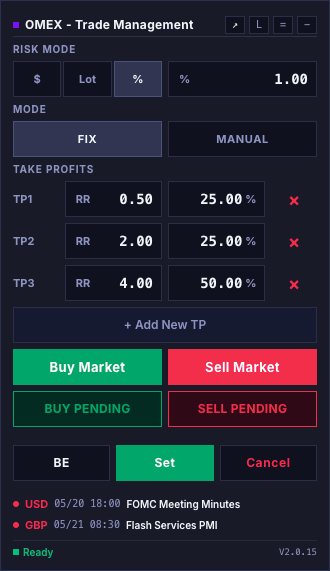
OMEX pairs a fast EasyAndFastGUI control panel with native MT5 chart objects, so you plan and place every trade visually — right on the chart.
Quick & free
Sign in, set your parameters, and download a ready-to-load .set file. Come back any time to tweak it.
Use your Google account — no password to remember.
Toggle options and pick presets on one page — the .set file updates live.
A MetaTrader 5 file with all your choices baked in.
Open the EA inputs (F7) → Load → pick the file. Done.
Scrollytelling
Never miscalculate a lot size or enter a wrong price again.
Clicking any order button spawns the corresponding chart lines at default distances. No order is sent to the broker at this stage.
User drags lines to desired levels. Real-time labels display the $ risk and calculated lot sizes dynamically as lines move.
Set → Sends the calculated order(s) when OneClickEntry is off. With OneClickEntry enabled, the final chart click submits automatically. Cancel always aborts the setup.
Three ways to instantly calculate your risk before executing a trade.
% balance
Fixed exposure
Cash cap
OMEX ships with two high-contrast themes co-engineered against the MT5 canvas. Swipe below to browse them. Your choice persists across timeframe and symbol changes.
Dark mode · default
Light mode
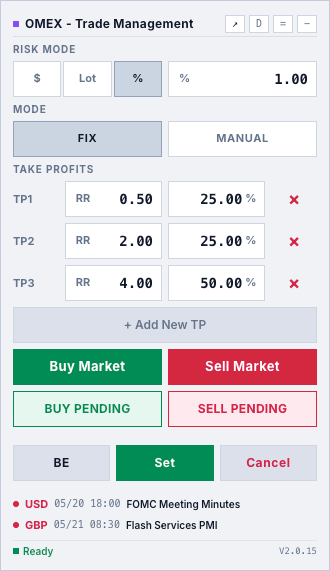
OMEX ships two complementary ways to plan your take-profits. Fix lays out multiple TPs at calculated R-multiples with a percentage split per level; Manual gives you a single TP you drag freely on the chart. Try both below and watch the right-hand chart update live.
In Fix mode, each TP carries its own RR multiplier and percentage of the position. Add or remove rows — the last percentage auto-balances so the column always totals 100%.
This mirrors how OMEX behaves on a live MT5 chart. Start with a clean canvas, click to place the Entry, then the SL — the RR guidelines appear the moment you move toward the SL. Place the TP and watch it snap to the nearest R-multiple. Reset to try again with a different step or with snap off.
Trade the way you think — set your risk, drag your levels, and let OMEX handle the lot math.
Instant download. No credit card required.