Stop calculating lot sizes manually. Drag, drop, and execute precision trades with dynamic risk management directly on your MT5 charts.
OMEX combines a powerful EasyAndFastGUI panel with native MT5 chart objects for an unparalleled hybrid trading experience.
Input your risk in %, Fixed Lot, or exact Dollar ($) amounts. OMEX calculates your position size instantly based on your SL distance.
Drag your Entry, Stop Loss, and Take Profit lines directly on the chart. See exact $ risk and reward update in real-time before you execute.
Place an Entry line. OMEX automatically determines whether to send a LIMIT or STOP order based on the current market price.
Each Take Profit has its own RR multiplier and percentage of the position to close. Add or remove TPs on the fly — the last percentage auto-balances to keep the total at 100%.
Hard ceiling on per-trade exposure as a configurable % of account equity. If a setup would exceed it, the trade is blocked and the panel shows exactly by how much.
Risk mode, risk amount, trade mode, TP table, panel position and theme all survive timeframe and symbol changes. Mid-trade setups are restored when the same symbol is reloaded.
Click a field and the value is "selected" — type to replace. Arrow keys nudge by type-aware steps (lot 0.01, %/RR 0.1, $ 10). Paste numeric values with Ctrl+V. Sub-1 floats like 0.2 just work.
One-tap theme toggle in the panel header. Tuned color palettes for both modes — brand purple, vivid buy/sell, outlined pending buttons.
A dedicated utility button to instantly move Stop Losses to Entry price for all active, profitable trades managed by the EA.
OMEX fetches the forex economic calendar once a day and surfaces only red-flag, high-impact events directly inside the panel — so you always know what is about to move price without leaving MT5.
In Manual mode, OMEX paints dotted gray lines at every R-multiple of your stop distance (configurable step, default 1R). Drag a TP near one and it snaps to that exact R level. Each guideline is labeled with its R value, so you always see where 1R, 2R, 3R sit before you commit.
Never miscalculate a lot size or enter a wrong price again.
Clicking any order button spawns the corresponding chart lines at default distances. No order is sent to the broker at this stage.
User drags lines to desired levels. Real-time labels display the $ risk and calculated lot sizes dynamically as lines move.
Set → Sends the calculated order(s) when OneClickEntry is off. With OneClickEntry enabled, the final chart click submits automatically. Cancel always aborts the setup.
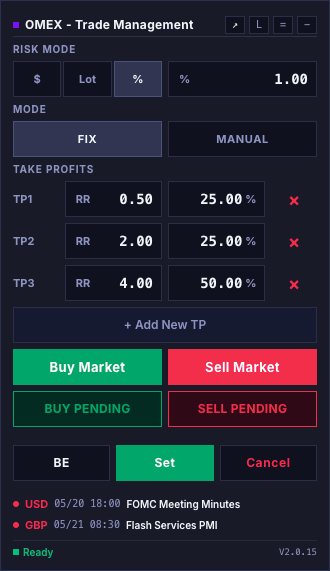
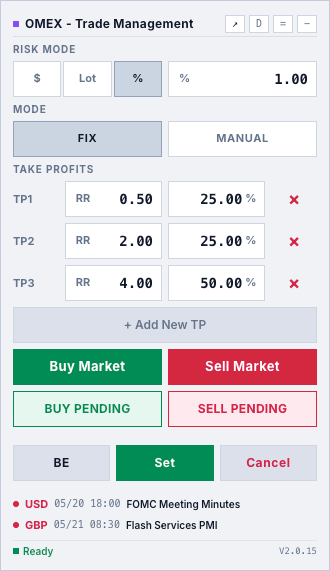
OMEX ships with two high-contrast themes co-engineered against the MT5 canvas. Both are real — toggle the L/D button inside either panel below to flip it live. Your choice persists across timeframe and symbol changes.
Deep slate background with subdued steel-blue selection states. Engineered for low-light trading cockpits and OLED panels where vivid color can fatigue across long sessions.
Cool off-white background with desaturated slate accents. Designed for daytime trading and high-ambient-light setups where dark themes wash out under sunlight.
Each panel is interactive — try the L/D button, switch Risk Mode, add a TP.
OMEX ships two complementary ways to plan your take-profits. Fix lays out multiple TPs at calculated R-multiples with a percentage split per level; Manual gives you a single TP you drag freely on the chart. Try both below and watch the right-hand chart update live.
In Fix mode, each TP carries its own RR multiplier and percentage of the position. Add or remove rows — the last percentage auto-balances so the column always totals 100%.
This mirrors how OMEX behaves on a live MT5 chart. Start with a clean canvas, click to place the Entry, then the SL — the RR guidelines appear the moment you move toward the SL. Place the TP and watch it snap to the nearest R-multiple. Reset to try again with a different step or with snap off.
To show upcoming red-flag economic events inside the panel, OMEX needs to call a public news API once per day. Paste one URL into MetaTrader 5 and you are done — it takes 30 seconds, only happens once per terminal, and there is nothing to install.
Click to copy
MetaTrader 5 blocks every outbound HTTP request from Expert Advisors by default — a security guardrail so a rogue EA cannot leak account data or pull arbitrary code. To use any feature that reaches the internet (news, sentiment, signals, etc.), you have to explicitly approve the exact URL. OMEX only calls this one endpoint, only sends a GET request (no account data, no credentials, no headers), and only does so once every 24 hours.
In MetaTrader 5: Tools → Options (or press Ctrl+O), then click the Expert Advisors tab.
Tick "Allow WebRequest for listed URL" and click Add.
Paste the URL shown at the top of this section exactly, then click OK.
Remove and re-attach OMEX to the chart. The first fetch runs immediately and high-impact events appear above the status row.
If the URL is not whitelisted, the news section simply stays hidden. OMEX logs a hint with the exact URL to the Experts journal — there are no errors, popups, or impact on trading.
A comprehensive breakdown of OMEX's feature sets, combining advanced UI methodologies with robust algorithmic execution.
Draggable, collapsible CCanvas panel titled "OMEX - Trade Management". Header carries a theme toggle (dark/light), toolbar-collapse, and minimize controls.
Risk Mode Selector: 3-way segmented control (%, Lot, $) with a numeric input field; the field auto-selects on focus and the active mode label appears as an inline prefix.
Fix / Manual Mode: in Fix mode each TP has an editable RR multiplier and percentage split; in Manual mode the RR column hides and the percentage column fills the row. Add or remove TPs on the fly with the last percentage auto-balancing to 100%.
Order Grid: 2×2 grid for Buy/Sell Market and Buy/Sell Pending order setups.
Breakeven Button: Iterates through all open positions by magic number and instantly moves SL to entry.
OBJ_HLINE). Used for pending orders only (market orders use current bid/ask).Each interactive line shows a live OBJ_TEXT tag displaying:
| Mode | Behavior |
|---|---|
| % | Risk a percentage of account equity based on SL pip distance. |
| Lot | Use fixed lot entered by user; auto-displays resulting $ risk. |
| $ | Risk a fixed dollar amount; back-calculates the required lot size. |
On Set, or on the final chart click when OneClickEntry is enabled, the EA compares the visual Entry line price to the current market price. No manual limits/stops needed:
BUY_STOP or SELL_LIMITBUY_LIMIT or SELL_STOPTotal lot size is split across TPs by per-row percentage (not equal share). The last TP's percentage is auto-derived so the column always sums to 100%.
A configurable max-risk cap blocks setups that exceed a set % of account equity. The Breakeven utility moves SL to entry + a configurable pip buffer for commission/swap.
| Input Variable | Description |
|---|---|
| MagicNumber | Unique identifier for EA-managed trades |
| Slippage | Max allowed slippage in points |
| BreakevenBuffer | Pips above entry for breakeven SL (covers fees) |
| DefaultSLDistance | Default SL line spawn distance (pips) |
| DefaultTPDistance | Default TP line spawn distance (pips) |
| DefaultEntryDistance | Default Entry line spawn distance for pending orders |
| OneClickEntry | When enabled, hides the Set button and submits the trade automatically on the final chart click |
| MaxRiskEnabled | When true, blocks any trade whose calculated risk exceeds MaxRiskPercent of account equity |
| MaxRiskPercent | Hard cap on per-trade risk as % of account equity (default 10%, only used when MaxRiskEnabled is true) |
| RRGuidelinesEnabled | Draws dotted gray RR guidelines on the chart while you move SL or any TP in Manual mode (default true) |
| RRSnapEnabled | TP placement and drag snap to the nearest RR guideline within ~40% of step distance (default true) |
| RRGuideStep | R-multiple spacing between RR guidelines (e.g. 0.5 draws 0.5R/1.0R/1.5R…; default 1.0) |
Join professional traders who execute with precision and perfect risk management.
Instant download. No credit card required.